Showing posts sorted by relevance for query masks. Sort by date Show all posts

Monday, 29 September 2008

New Masks


I have had these made for a lil while now, and just never got round to uploading them, so here they are =D


I'm also working on more new masks


Butter will be a happy bunny now, she's been waiting a while on these masks lmao

Tuesday, 23 December 2008

Masks 306-310


as you can see, some of these masks were made using artwork by Suzanne woolcott.
The items used in these masks were purchased at etsy as element packs and are allowed to be used in this way. I double checked just to be sure lol
Have a great Christmas everyone
huggies
Chelle
xoxox

Monday, 5 October 2009

Haloween Masks

Using the gorgeous brushes from Obsidian Dawn!!!!!

A set of 4 Halloween masks for you to play with.


Click on the image to see it in full size then simply, right click, and save as.
Hope you enjoy these masks!!!

Sunday, 20 June 2010

Masks


A Couple of new masks if anyone wants em...same tou as my other masks apply =oD

Tuesday, 30 December 2008

More Masks


Masks 336-340
I know, there are some Christmasy ones in there so I'm a little late lol
enjoy anyway
xox


Saturday, 18 April 2009

Masks


I played and made a couple of masks. Hopefully someone can use them lol


Right click and save as


Friday, 26 December 2008

More Masks

Well I hope you all had a fabulous Christmas.

My kiddies were spoiled rotten and Santa was very very good to them lol.

We're now looking forward to the New Year, so good wishes to everyone for a super New Year!

heres masks 316-320


Monday, 22 December 2008

Masks

It's taking me longer than expected to finish off the next folder of masks Ive made, so I thought I'd pop some one here for you all to download, and once I get to 60, I'll zip them up for those who havent saved them lol


Heres the first 5 from the next lot, enjoy, and please leave some love.....It's kinda encouraging :P


right click and save as

xox


Monday, 20 October 2008

Play Time


Finally, I snapped up some play tme this morning lol. Kiddies were still asleep, so I had a lil play in PSP to pass the time. Heres what I came up with. It uses one of the new masks Im working on lol. Im hoping to have another folder available in the next few days as there are some Halloween type masks in there =D. The scrap kit is available form Danielle Corbitts blog...here I think it's on page 2, and it's called 'Summer Garden' Thanks Danielle for a fantastic freebie xox

Tuesday, 2 June 2009

Masks 350-355

grrrr I havent had much pc time at all lately.....not good!
During the day, I get time to come on the pc, but not actually make anything, and in the ervening, by the time kiddies are asleep, I really am not in the mood to make anything *sob*
Anyway, I made some masks just now while waiting to get kids up for school, so hope they're ok for someone at least lol.
Right click and save as


Monday, 5 October 2009

Mask Tutorial


Ok so lately a few people have mailed and asek me about my mask tutorial.....I made it last year, but when I moved webhosts.....My mask tutorial didnt get added cos there werent that many hits on it lol. Anyway, Ive decided to stick it on my blog here, that way, if anyone wants it, it's here.


A few people have asked me to write a mask tutorial, so I thought I'd share with you how I make mine. It's very basic, you dont need alot of PSP knowledge to use this tutorial.
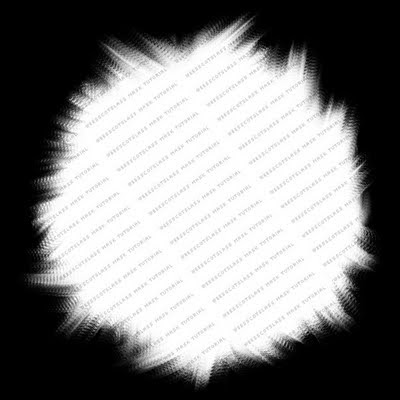


Lets begin!


1. Open a new canvas 600x600 and fill black.


2. Grab your preset shape tool set to circle, inner, white, outer, null. Draw out a large circle,
objects, align, center in canvas. Convert to raster.


3. Grab your smudge tool, settings as follows.



4. I used a flower brush, but you can use any kind of brush for this part.


5. Go to the edge of your circle anywhere on your canvas, start pushing the cirlce in towards
itself.
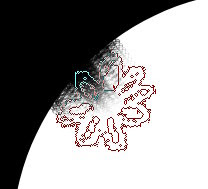


6. Continue to do this all the way around so you have a ragged edge. I also smudge the white
outward, but it depends on the size of your circle. You dont want any of the white to
touch the edge of your canvas, or else you'll notice a line around your tag when you use the
mask. Like below.



7. You should now have a canvas that looks smilar to this
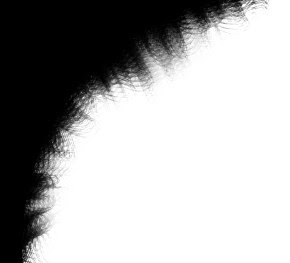


8. Once happy with your new mask...save it as a jpeg, remember to give it a name too so that
people know it belongs to you, you never know,
you may start making tons of masks and sharing them :P


There are tons of different things you can use to make masks, I use brushes, ding fonts, preset shapes, lots of different filters etc,
so play around with it once you start, there is so much you can do with the effects of PSP ;)


Thanks for trying my tutorial


This tutorial was written by me, weescotslass on 8th March 2008, any resemblance to any other tutorial is completely coincidental.


Registered with TWI.

Sunday, 28 December 2008

Masks 326-330
